Constructor
new Grid(containernullable, getTextopt)
Properties:
| Name | Type | Attributes | Default | Description |
|---|---|---|---|---|
columns |
Array.<GridColumnDefinition> | 列定义的数组 |
||
langs |
GridLanguages |
<optional> |
多语言资源对象 |
|
virtualCount |
number |
<optional> |
100
|
行数大于等于该值则启用虚模式 |
autoResize |
boolean |
<optional> |
true
|
未设置宽度的列自动调整列宽 |
rowHeight |
number |
<optional> |
36
|
表格行高,修改后同时需要在 |
lineHeight |
number |
<optional> |
18
|
文本行高(多行文本列计算高度时使用) |
filterIcon |
string |
<optional> |
ellipsis-h
|
列头未过滤时的图标 |
filteredIcon |
string |
<optional> |
filter
|
列头已过滤时的图标 |
extraRows |
number |
<optional> |
0
|
列表底部留出额外的空白行 |
filterRowHeight |
number |
<optional> |
30
|
过滤条件列表的行高 |
height |
number |
<optional> |
列表高度值,为 0 时列表始终显示全部内容(自增高),为非数字或者小于 0 则根据容器高度来确定虚模式的渲染行数 |
|
multiSelect |
boolean |
<optional> |
false
|
是否允许多选 |
fullrowClick |
boolean |
<optional> |
true
|
为 |
tooltipDisabled |
boolean |
<optional> |
false
|
单元格 tooltip 是否禁用 |
headerVisible |
boolean |
<optional> |
true
|
列头是否显示 |
headerWrap |
boolean |
<optional> |
true
|
列头是否允许换行 |
rowDraggable |
boolean |
<optional> |
false
|
是否允许行间拖拽 since 1.0.3 |
window |
Window | HTMLElement |
<optional> |
global
|
监听事件的窗口载体 |
sortIndex |
number |
<optional> |
-1
|
排序列的索引 |
sortDirection |
GridColumnDirection |
<optional> |
GridColumnDirection.Ascending
|
排序方式,正数升序,负数倒序 |
sortArray |
Array.<GridColumnSortDefinition> |
<optional> |
排序列数组 |
|
expandable |
boolean |
<optional> |
false
|
是否支持点击扩展 |
expandableGenerator |
GridExpandableObjectCallback |
<optional> |
扩展行生成器 |
Examples
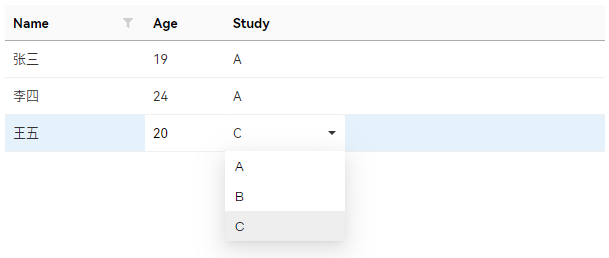
基础示例
<div id="grid"></div>#grid>.ui-grid {
width: 600px;
height: 400px;
}const grid = new Grid('#grid', GetTextByKey);
grid.columns = [
{
key: 'name',
caption: 'Name',
width: 140,
allowFilter: true
},
{
key: 'age',
caption: 'Age',
type: Grid.ColumnTypes.Input,
width: 80
},
{
key: 'study',
caption: 'Study',
type: Grid.ColumnTypes.Dropdown,
width: 120,
source: [
{ value: 'a', text: 'A' },
{ value: 'b', text: 'B' },
{ value: 'c', text: 'C' }
]
}
];
grid.multiSelect = true;
grid.init();
grid.source = [
{ name: '张三', age: '19', study: 'a' },
{ name: '李四', age: '24', study: 'a' },
{ name: '王五', age: '20', study: 'c' }
];Parameters:
| Name | Type | Attributes | Description | ||||||||||||||||
|---|---|---|---|---|---|---|---|---|---|---|---|---|---|---|---|---|---|---|---|
container |
string | HTMLElement |
<nullable> |
Grid 控件所在的父容器,可以是 string 表示选择器,也可以是 HTMLElement 对象 |
||||||||||||||||
getText |
function |
<optional> |
获取多语言文本的函数代理 Properties
|
Classes
Members
(readonly) allSource :Array.<GridRowItem>
返回所有数据的数据(未过滤)
Type:
- Array.<GridRowItem>
(readonly) changed :boolean
获取当前 Grid 是否已发生改变
Type:
- boolean
(readonly) currentItem :GridRowItem|null
获取当前选中的行对象
Type:
- GridRowItem | null
(readonly) element :HTMLDivElement
获取 Grid 的页面元素
Type:
- HTMLDivElement
loading :boolean
获取或设置 Grid 当前的加载状态
Type:
- boolean
readonly :boolean
获取或设置 Grid 是否为只读
Type:
- boolean
scrollTop :number
获取或设置 Grid 当前滚动的偏移量
Type:
- number
(readonly) selectedIndex :number
获取当前选中行的索引,为 -1 则当前没有选中行
Type:
- number
selectedIndexes :Array.<number>
获取或设置当前选中的行索引的数组,设置后会刷新列表
Type:
- Array.<number>
(readonly) sortKey :string|null
获取当前排序的列关键字,为 null 则当前无排序列
Type:
- string | null
source :Array.<GridRowItem>
获取已过滤的数据数组,或者设置数据并刷新列表
Type:
- Array.<GridRowItem>
(readonly) sourceExpandable :Array.<GridExpandableObject>
Properties:
| Name | Type | Description |
|---|---|---|
element |
HTMLElement | 扩展行元素 |
获取已过滤的数据中的扩展对象数组
Type:
- Array.<GridExpandableObject>
(readonly) startIndex :number
获取虚模式起始索引
Type:
- number
total :GridRowItem
获取或设置合计行数据
Type:
(readonly) virtual :boolean
获取当前是否为虚模式状态
Type:
- boolean
(static, readonly) ColumnTypes :GridColumnTypeEnum
Properties:
| Name | Type | Default | Description |
|---|---|---|---|
Common |
number |
0
|
通用列(只读) |
Input |
number |
1
|
单行文本列 |
Dropdown |
number |
2
|
下拉选择列 |
Checkbox |
number |
3
|
复选框列 |
Icon |
number |
4
|
图标列 |
Text |
number |
5
|
多行文本列 |
Date |
number |
6
|
日期选择列 |
Radio |
number |
7
|
单选框列 |
列类型枚举
Type:
Methods
addItem(item, indexopt) → {GridRowItem}
Parameters:
| Name | Type | Attributes | Description |
|---|---|---|---|
item |
GridRowItem | 待添加的行数据值 |
|
index |
number |
<optional> |
待添加的行索引 |
Returns:
返回已添加的行数据
- Type
- GridRowItem
addItems(array, indexopt) → {Array.<GridRowItem>}
Parameters:
| Name | Type | Attributes | Description |
|---|---|---|---|
array |
Array.<GridRowItem> | 待添加的行数据数组 |
|
index |
number |
<optional> |
待添加的行索引 |
Returns:
返回已添加的行数据数组
- Type
- Array.<GridRowItem>
clearHeaderCheckbox()
expandAll(expandedopt) → {boolean}
Parameters:
| Name | Type | Attributes | Description |
|---|---|---|---|
expanded |
boolean |
<optional> |
是否展开,传 null 则切换展开状态 |
Returns:
展开状态
- Type
- boolean
export(compressedopt, moduleopt) → {Promise.<GridExportData>}
- Description:
导出已压缩的数据源,结构为
{
  columns: [],
  source: [],
  rowHeight: number,
  sortDirection: number,
  sortKey?: string,
  sortArray?: Array<{
    column: string,
    order: "asc" | "desc"
  }>
}
- Source:
- Since:
- 1.0.2
Parameters:
| Name | Type | Attributes | Default | Description |
|---|---|---|---|---|
compressed |
string | boolean |
<optional> |
deflate
|
压缩编码,传入 false 则取消压缩 |
module |
string |
<optional> |
压缩模块,默认采用 wasm_flate.deflate 编码,自定义模块需要实现以下消息事件
|
Returns:
返回 Uint8Array 数据对象
- Type
- Promise.<GridExportData>
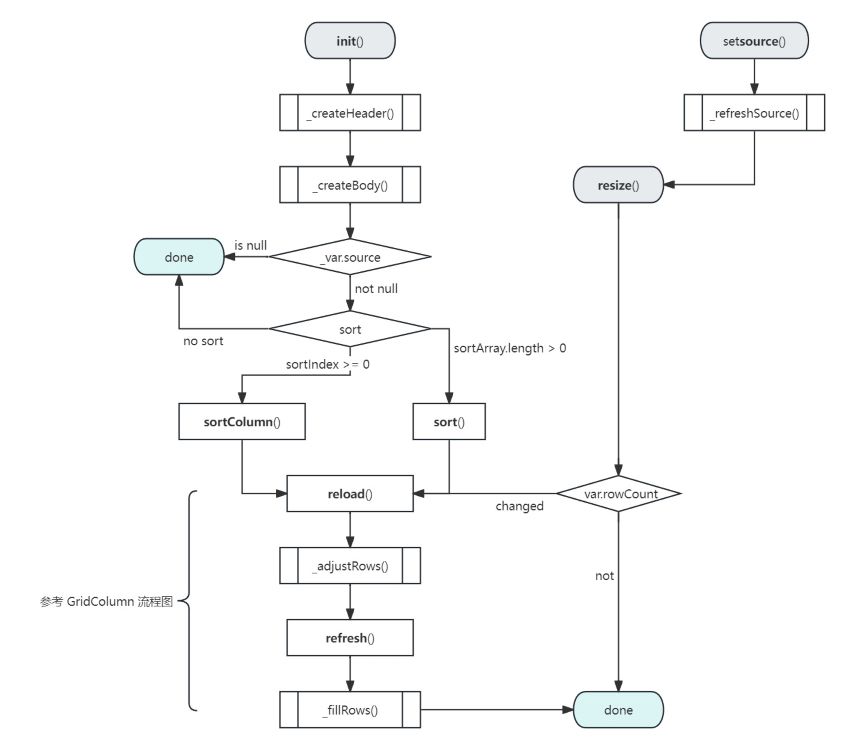
init(containeropt)
Parameters:
| Name | Type | Attributes | Default | Description |
|---|---|---|---|---|
container |
HTMLElement |
<optional> |
.ctor#container
|
父容器元素,若未传值则采用构造方法中传入的父容器元素 |
refresh()
reload(keepopt)
Parameters:
| Name | Type | Attributes | Description |
|---|---|---|---|
keep |
boolean |
<optional> |
是否保持当前滚动位置 |
removeItem(index) → {GridRowItem}
Parameters:
| Name | Type | Description |
|---|---|---|
index |
number | 待删除的行索引 |
Returns:
返回已删除的行数据
- Type
- GridRowItem
removeItems(indexesopt) → {Array.<GridRowItem>}
Parameters:
| Name | Type | Attributes | Description |
|---|---|---|---|
indexes |
Array.<number> |
<optional> |
待删除的行索引数组,未传值时删除所有行 |
Returns:
返回已删除的行数据数组
- Type
- Array.<GridRowItem>
resetChange()
resize(forceopt, keepopt, callbackopt)
Parameters:
| Name | Type | Attributes | Description |
|---|---|---|---|
force |
boolean |
<optional> |
是否强制 |
keep |
boolean |
<optional> |
是否保持当前滚动位置 |
callback |
function |
<optional> |
计算大小后的回调函数,上下文为 Grid |
scrollToIndex(index)
Parameters:
| Name | Type | Description |
|---|---|---|
index |
number | 待滚动至的行索引 |
setData(source)
Parameters:
| Name | Type | Description |
|---|---|---|
source |
Array.<GridRowItem> | 待设置的数据列表 |
setItem(index, item)
Parameters:
| Name | Type | Description |
|---|---|---|
index |
number | 行索引 |
item |
GridRowItem | 待设置的行数据对象 |
showSortPanel(callbackopt, layoutopt)
Parameters:
| Name | Type | Attributes | Description |
|---|---|---|---|
callback |
function |
<optional> |
更新回调函数 @since 1.0.3 |
layout |
boolean |
<optional> |
是否显示更新 layout 复选框 @since 1.0.3 |
sort(reloadopt)
Parameters:
| Name | Type | Attributes | Description |
|---|---|---|---|
reload |
boolean |
<optional> |
为 |
sortColumn(reloadopt)
Parameters:
| Name | Type | Attributes | Description |
|---|---|---|---|
reload |
boolean |
<optional> |
为 |
Events
cellClicked
This:
Parameters:
| Name | Type | Description |
|---|---|---|
index |
number | 点击的行索引 |
colIndex |
number | 点击的列索引 |
Returns:
返回 false 则取消事件冒泡
- Type
- boolean
onBodyScrolled
This:
Parameters:
| Name | Type | Attributes | Description |
|---|---|---|---|
e |
Event |
<optional> |
滚动事件对象 |
index |
number | 起始行 |
|
count |
number | 显示行数 |
onCellDblClicked
This:
Parameters:
| Name | Type | Description |
|---|---|---|
index |
number | 双击的行索引 |
colIndex |
number | 双击的列索引 |
onColumnChanged
This:
Parameters:
| Name | Type | Description |
|---|---|---|
type |
"reorder" | "resize" | "sort" | 事件类型
|
colIndex |
number | 发生变化事件的列索引 |
value |
number | GridColumnDirection | 变化的值 |
onRowChanged
This:
Parameters:
| Name | Type | Description |
|---|---|---|
action |
"update" | "add" | "remove" | "drag" | 变动类型 |
items |
Array.<GridRowItem> | 发生变动的行对象 |
indexes |
number | Array.<number> | 变动的索引集合 |
onRowCollapsed
This:
Parameters:
| Name | Type | Description | ||||||
|---|---|---|---|---|---|---|---|---|
item |
GridRowItem | 行数据对象 |
||||||
expandableObject |
GridExpandableObject | 由 Properties
|
onRowDblClicked
This:
Parameters:
| Name | Type | Description |
|---|---|---|
index |
number | 双击的行索引 |
onRowExpanded
This:
Parameters:
| Name | Type | Description | ||||||
|---|---|---|---|---|---|---|---|---|
item |
GridRowItem | 行数据对象 |
||||||
expandableObject |
GridExpandableObject | 由 Properties
|
onSelectedRowChanged
This:
Parameters:
| Name | Type | Description |
|---|---|---|
index |
number | 选中的行索引 |
willSelect
This:
Parameters:
| Name | Type | Description |
|---|---|---|
index |
number | 即将选中的行索引 |
colIndex |
number | 即将选中的列索引 |
Returns:
返回 false、null、undefined、0 等则取消选中动作
- Type
- boolean